
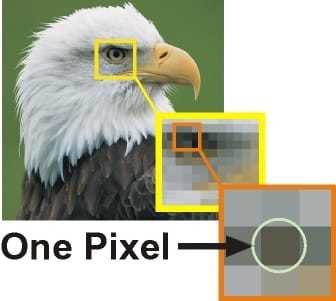
The little squares that make up digital pictures are called pixels. Consider pixels to be like dots on a painting. The image you see on your screen is the result of these dots coming together. Color and brightness information is stored in each pixel. The entire image is made up of all these pixels together.Pixels can be compared to building bricks. Your image seems sharper and clearer the more of them you have. Thus, a high pixel count will result in a sharp, detailed image.The things we see appear to our eyes as continuous, smooth surfaces. It’s similar to watching a movie. However, these little squares really make up digital pictures, much like puzzle pieces.
Bitmap and vector pictures are the two primary categories of digital images. Bitmap pictures consist of small squares, often known as pixels. These pixels become visible at close range when you enlarge a bitmap image. Even though it appears that each pixel is multicolored, each pixel can only have one color.
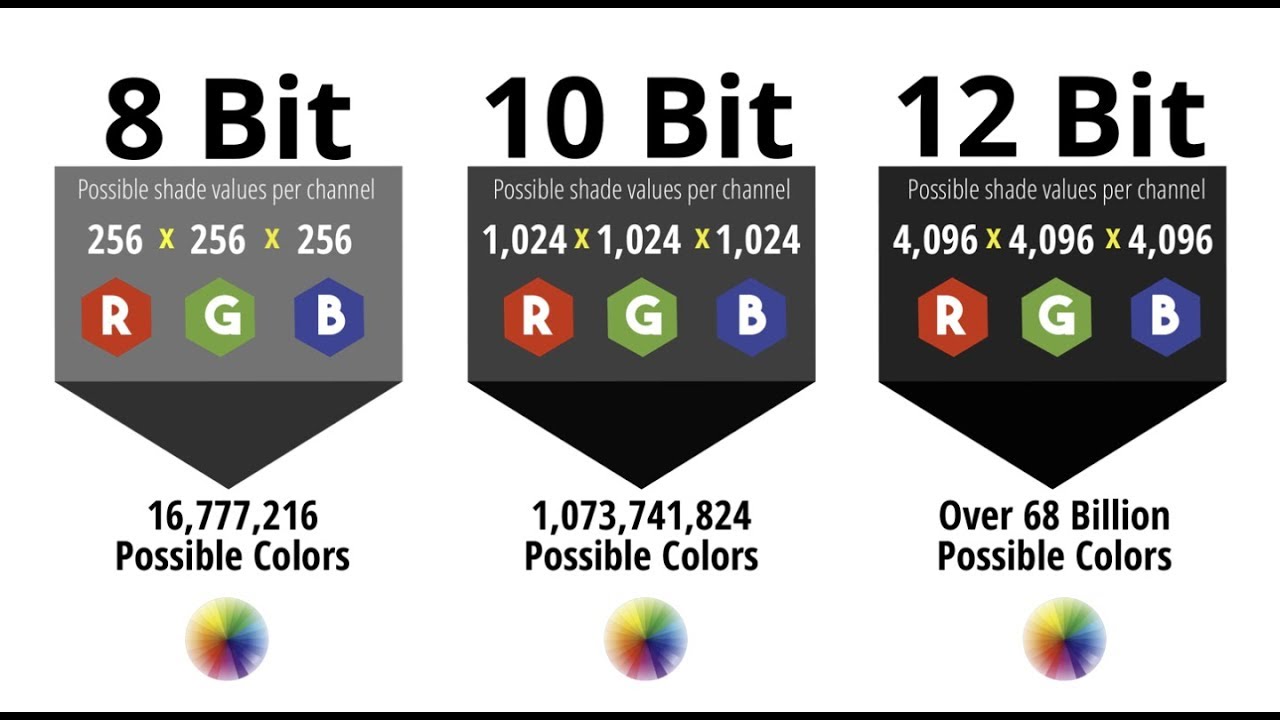
Let’s now discuss bit depth. This corresponds to the capacity of each pixel to store information. Put more simply, it’s the number of colors that each dot on the canvas can display. Consider that every pixel is a little box that can carry more colors the more bits it has.
Binary RGB is like a color code for digital photos. It’s similar to mixing paints. Red, Green, and Blue (RGB) are the main colors on screens. Each color is represented by a number from 0 to 255, showing how much of that color is used. By adjusting these numbers, we can make lots of different colors. For example, a 24-bit picture can show millions of colors because each pixel can mix lots of different shades of red, green, and blue.
In summary, digital pictures are composed of little dots, or pixels, each of which contains information about brightness and color. The picture becomes clearer the more dots there are. RGB aids in blending the colors to create the entire image, whereas bit depth determines how many colors each dot may display.